> For the complete documentation index, see [llms.txt](https://docs.allout.game/llms.txt). Markdown versions of documentation pages are available by appending `.md` to page URLs; this page is available as [Markdown](https://docs.allout.game/core-engine-concepts/inventory.md).
# Inventory
### Overview
All Out provides a player inventory API that allows you to create items, give them to players, and for players to arrange, use, and drop items in your game.
There are three core concepts:
* **Item definitions** (`Item_Definition`): what an item *is* (name/icon/stacking + your own fields)
* **Item instances** (`Item_Instance`): an actual stack in the world/in an inventory
* **Inventories** (`Inventory`): a container of slots that holds item instances
Every player has a built-in inventory at `player.default_inventory`.
### Persistence
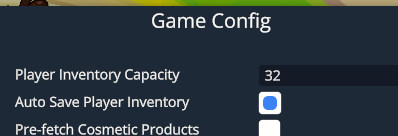
If you'd like player inventories to be automatically saved across game sessions, enable the **Auto Save Player Inventory** box in the **Edit → Game Config** section of the editor.
{% hint style="info" %}
Configure both settings programmatically in `ao_before_scene_load`, before player inventories are created or restored:
```csl
ao_before_scene_load :: proc() {
Scene.set_player_inventory_capacity(32);
Scene.set_auto_save_player_inventory(true);
}
```
The configured capacity is the minimum used during a persistent restore; a larger capacity stored in the save is preserved. Changing the scene setting in `Player.ao_start` is too late for that player's restored `default_inventory` and does not resize it. Use `Items.set_capacity` when you intentionally need to resize an existing inventory. Shrinking fails if a slot being removed contains an item.
{% endhint %}
### Named player inventories
Create persistent inventories only during the player's `ao_start`. Each key belongs to that player:
```csl
bank: Inventory;
ao_start :: method() {
bank = Items.create_player_inventory(this, "bank", capacity=48);
}
```
The call returns a restored inventory synchronously. Repeating it with the same player and key during `ao_start` returns the same inventory without resetting its contents or capacity. Calls outside that player's `ao_start` fail even if the inventory already exists; keep the returned inventory in a field for later use. Keys must contain only letters, numbers, underscores, or hyphens and cannot be empty. Keep the key stable across game versions.
Named inventories are automatically saved independently of the default inventory's auto-save setting. The engine saves and destroys them when the player leaves; do not add a matching `destroy_inventory` call. Removing a registration from your game does not erase its saved data. Use the existing item movement and inventory drawing APIs with the returned inventory.
The default inventory keeps its existing `$AO.inventory` save key, encoded format, and fetch path. Named inventories use separate `$AO.inventory_` save entries. Both travel through the existing player startup path; no default-inventory migration is needed.
For a saved inventory, capacity is the greater of the requested initial capacity and saved capacity. Use `Items.set_capacity` for subsequent changes. Register item definitions before players join.
After directly modifying an item's `@ao_serialize` fields, call `Items.mark_item_dirty(item)` to save the containing inventory. Normal inventory operations already mark changes dirty. CSL networking replicates the fields automatically.
### Inventory API reference
```go
Scene :: struct {
get_player_inventory_capacity :: proc() -> int;
set_player_inventory_capacity :: proc(capacity: int);
get_auto_save_player_inventory :: proc() -> bool;
set_auto_save_player_inventory :: proc(enabled: bool);
}
Item_Definition_Desc :: struct {
id: string;
name: string;
icon: Texture_Asset;
stack_size: s64; // 1 = not stackable, -1 = infinite
tier: Item_Tier;
}
Items :: struct {
// Inventories
create_inventory :: proc(unique_id: string, capacity: s64) -> Inventory;
create_player_inventory :: proc(player: Player, key: string, capacity: s64) -> Inventory;
destroy_inventory :: proc(inventory: Inventory) -> bool;
mark_item_dirty :: proc(item: Item_Instance);
set_capacity :: proc(inventory: Inventory, capacity: s64);
// Item definitions + instances
register_item_definition :: proc(desc: Item_Definition_Desc, $Definition_Type: typeid = Item_Definition, instance_type: typeid = Item_Instance) -> Definition_Type;
create_item_instance :: proc(definition: Item_Definition, count: s64 = 1) -> Item_Instance;
create_item_instance :: proc(definition: Item_Definition, $T: typeid, count: s64 = 1) -> T;
destroy_item_instance :: proc(instance: Item_Instance, count: s64 = -1);
// Moving items around
can_move_item_to_inventory :: proc(instance: Item_Instance, inventory: Inventory, will_destroy_item: ref bool) -> bool;
move_item_to_inventory :: proc(instance: Item_Instance, inventory: Inventory);
move_as_many_items_as_possible_to_inventory :: proc(instance: Item_Instance, inventory: Inventory, destroyed_item: ref bool) -> s64;
remove_item_from_inventory :: proc(instance: Item_Instance, inventory: Inventory);
can_move_all_items :: proc(entries: []Item_Transaction_Entry) -> bool;
move_all_items :: proc(entries: []Item_Transaction_Entry);
can_swap_items :: proc(inventory_a: Inventory, inventory_b: Inventory, slot_a: s64, slot_b: s64) -> bool;
swap_items :: proc(inventory_a: Inventory, inventory_b: Inventory, slot_a: s64, slot_b: s64);
// Queries
calculate_room_in_inventory_for_item :: proc(definition: Item_Definition, inventory: Inventory) -> s64;
destroy_all_items :: proc(inventory: Inventory);
// UI (optional)
draw_inventory :: proc(rect: Rect, inventory: Inventory, options: Inventory_Draw_Options) -> bool;
draw_hotbar :: proc(player: Player, inventory: Inventory, options: Inventory_Draw_Options) -> Draw_Hotbar_Result;
}
Inventory :: class {
slots :: method() -> Inventory_Slot_Iterator;
get_item :: proc(inventory: Inventory, index: s64) -> Item_Instance;
has_item_id :: proc(inventory: Inventory, item_id: string) -> bool;
capacity: s64 #read_only;
}
Item_Definition :: class {
get_icon :: method() -> Texture_Asset;
id: string #read_only;
name: string #read_only;
type: typeid #read_only;
instance_type: typeid #read_only;
tier: Item_Tier #read_only;
}
Item_Instance :: class {
quantity: s64 #read_only; // stack count
slot_index: s64 #read_only; // slot in the parent inventory
inventory: Inventory #read_only; // parent inventory (null if not in one)
get_definition :: method() -> Item_Definition;
}
Item_Transaction_Entry :: struct {
instance: Item_Instance;
inventory: Inventory;
}
Inventory_Draw_Options :: struct {
title: string;
show_exit_button: bool;
show_scroll_bar: bool;
show_background: bool;
allow_drag_drop: bool;
drag_drop_color_multiplier: v4;
hotbar_item_count: int;
columns: int;
rows: int;
force_select_hotbar_index: int;
hide_bag_button: bool;
enable_selection: bool;
scroll_item_selection: bool;
keyboard_item_selection: bool;
enable_use_from_hotbar: bool;
on_before_draw: (proc(item: Item_Instance, rect: Rect));
on_after_draw: (proc(item: Item_Instance, rect: Rect));
inventory_default :: proc() -> Inventory_Draw_Options; // hotbar_item_count = 0
hotbar_default :: proc() -> Inventory_Draw_Options; // hotbar_item_count = 6
}
Draw_Hotbar_Result :: struct {
selected_item: Item_Instance;
selected_item_index: s64;
dropped_item: Item_Instance;
entire_rect: Rect;
inventory_open: bool;
inventory_open_t: float;
}
```
### Quick start (register + give an item)
Register item definitions once in `ao_before_scene_load`, then create instances and move them into a player’s inventory.
```go
// Optional: custom item types
Weapon_Definition :: class : Item_Definition {
damage: s64;
}
Weapon_Item :: class : Item_Instance {
@ao_serialize durability: s64;
}
sword_defn: Weapon_Definition;
ao_before_scene_load :: proc() {
sword_defn = Items.register_item_definition(
{id="sword", name="Iron Sword", icon=get_asset(Texture_Asset, "icons/sword.png"), stack_size=1, tier=.COMMON},
Weapon_Definition,
Weapon_Item
);
sword_defn.damage = 10;
}
give_sword :: proc(player: Player) {
item := Items.create_item_instance(sword_defn, Weapon_Item);
will_destroy: bool;
if Items.can_move_item_to_inventory(item, player.default_inventory, ref will_destroy) {
item.durability = 100;
Items.move_item_to_inventory(item, player.default_inventory);
// If will_destroy is true, the item was absorbed into an existing stack
// and this item reference should not be used after the move.
}
else {
// Inventory full → destroy the instance we created
Items.destroy_item_instance(item);
}
}
```
Every custom `Item_Instance` field that must survive inventory save and restore needs `@ao_serialize`. A field without it returns to its normal default after restoration. For nested custom classes, annotate both the containing field and each nested field that must persist.
Persist a selection such as an equipped weapon using `Save.save_item_reference(player, key, item)` and `Save.get_item_reference(player, key)`. The item may belong to the player's auto-saved `default_inventory` or any named player inventory. References survive slot rearrangement within that inventory and rejoining. Removing, dropping, destroying, or transferring an item to any other inventory invalidates its old references, even for the same player or if the item later returns. A stack consumed by a merge also invalidates its references. Create named inventories before resolving saved selections. Inventory remains authoritative for ownership and item fields, so do not copy those values into Save.
`item.entry_id_in_inventory` exposes the current inventory's entry number for diagnostics. It is positive while the item is owned, remains unchanged when slots are rearranged, changes on transfers, and becomes `0` when detached. Save references include the inventory key along with this number. Use `Save.save_item_reference` rather than persisting the number directly.
### Displaying the hotbar
To show the standard inventory hotbar UI on screen, call `Items.draw_hotbar` inside your Player's `ao_late_update` method. Without it, the inventory system works behind the scenes but the player won't see it!
```go
Player :: class : Player_Base {
ao_late_update :: method(dt: float) {
if this.is_local_or_server() {
draw_player_hotbar(this);
}
}
}
draw_player_hotbar :: proc(player: Player) {
options := Inventory_Draw_Options.hotbar_default();
options.hide_bag_button = false;
result := Items.draw_hotbar(player, player.default_inventory, options);
// result.selected_item is the currently highlighted item (or null)
// result.inventory_open tells you if the full bag UI is showing
}
```
{% hint style="info" %}
`Items.draw_hotbar` handles the entire hotbar + bag toggle UI for you. It returns a `Draw_Hotbar_Result` with `selected_item`, `selected_item_index`, `inventory_open`, and `dropped_item` fields.
{% endhint %}
{% hint style="warning" %}
`hide_bag_button = true` prevents the player from opening the backpack. If the backpack is already open, it will close, so only use it when players still have another way to access important items.
{% endhint %}
### Checking if a player already has an item
A common pattern is to give an item only if the player doesn't already have one:
Use the definition's registered ID:
```go
give_sword_if_needed :: proc(player: Player) {
if player.default_inventory.has_item_id("sword") return;
give_sword(player);
}
```
You can also check how much room is left for a specific item type before creating it:
```go
room := Items.calculate_room_in_inventory_for_item(sword_defn, player.default_inventory);
if room > 0 {
give_sword(player);
}
```
### Custom Inventories
You can create inventories that aren’t tied to a player, for things like:
* Chests / storage containers
* Fish/mob teams
```go
chest_inventory := Items.create_inventory("chest_01", 12);
```
To access items:
```go
for item, slot: chest_inventory.slots() if item != null {
defn := item.get_definition();
log_info("Slot %: %", {slot, defn.name});
}
```
`slots()` visits every slot in order. `item` is `null` for an empty slot, and the optional second loop variable is the actual slot index. Use `get_item(index)` when you need random access to one slot.
### Atomic item moves
Use a transaction when several item moves must either all succeed or all fail:
```go
moves: [..]Item_Transaction_Entry;
moves.append({instance = sword, inventory = player.default_inventory});
moves.append({instance = shield, inventory = player.default_inventory});
if Items.can_move_all_items(moves) {
Items.move_all_items(moves);
}
```
Each item instance may appear only once in the transaction. Always call `can_move_all_items` first; `move_all_items` asserts if the complete transaction no longer fits. A move can merge a stack and destroy the moved instance, so do not keep using item references after the transaction.
### Dropped Items
If you want players to drop items into the world (and let other players pick them up), use the dropped items system:
```go
import "core:dropped_items"
```
#### Spawning a dropped item
```go
item := Items.create_item_instance(sword_defn, Weapon_Item);
dropped := Dropped_Item.spawn(player.entity.world_position, item);
```
#### Drop animation + snapping to navmesh
```go
gameplay_rng: u64;
dropped.do_spawn_animation(ref gameplay_rng, navmesh); // navmesh is optional
```
#### Handling drag-drop from the hotbar UI
If you use `Items.draw_hotbar`, players can drag an item out of the UI to drop it. `Dropped_Item.handle_dropped_item` removes it from the inventory and spawns a dropped item entity.
```go
result := Items.draw_hotbar(player, player.default_inventory, Inventory_Draw_Options.hotbar_default());
dropped: Dropped_Item;
if Dropped_Item.handle_dropped_item(result, player.entity.world_position, ref dropped) {
dropped.do_spawn_animation(ref gameplay_rng, navmesh);
}
```
{% hint style="info" %}
Dropped items automatically despawn over time (with a warning bar). Holding the interact button on an item resets its despawn timer.
{% endhint %}
{% hint style="info" %}
You can make a dropped item exclusive (only visible/pickable by one player) using `dropped.set_exclusive(player)`.
{% endhint %}