> For the complete documentation index, see [llms.txt](https://docs.allout.game/llms.txt). Markdown versions of documentation pages are available by appending `.md` to page URLs; this page is available as [Markdown](https://docs.allout.game/core-engine-concepts/interactables.md).
# Interactables
### The Interactable Component
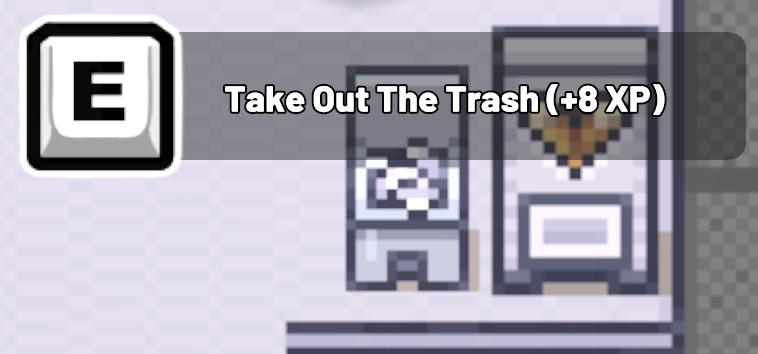
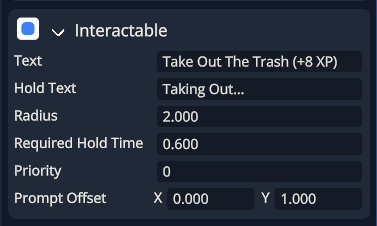
Adding an Interactable component to an entity will automatically show UI when players are within the `radius` you specify.
The interaction radius scales with the entity's world scale, so keep the interactable root at scale 1 and scale a visual child when you want the interaction range to stay fixed.
To respond to the player pressing the interactable, you'll need to write CSL code.
An entity can have more than one `Interactable`. Use `priority` when multiple prompts might be available at the same time.
{% hint style="warning" %}
Prompt selection is per-player, but prompt content is not. `can_use(player)` controls whether a player can see and use an interactable; `set_text`, `set_hold_text`, `set_subtitle`, and `subtitle_color` change the one shared component seen by every player. Do not refresh those values from player-specific quest, inventory, or progression state—Player A's last write would also be shown to Player B.
For different per-player actions such as "Accept Quest" and "Turn In", use a neutral shared label such as "Talk", or add separate fixed-label interactables and gate each one with `can_use(player)`. Each player will then select from the interactables valid for their own state.
{% endhint %}
The most common pattern is:
* Create a class that inherits from `Interactable`
* Call `this.set_listener(this)` in `ao_start`
* Implement `can_use` and `on_interact` on your class
{% hint style="info" %}
If you add a new interactable class in code, you still need to add that component to an entity in the editor (or spawn an entity and add the component at runtime).
{% endhint %}
#### Trash Example
```go
// Get coins for picking up the trash :D
Trash :: class : Interactable {
@ao_serialize coins: s64;
used: bool;
ao_start :: method() {
this.set_listener(this);
this.set_text("Pick up trash");
this.set_hold_text("Picking up...");
required_hold_time = 0.25;
radius = 1.25;
}
can_use :: method(player: Player) -> bool {
if used return false;
return true;
}
on_interact :: method(player: Player) {
used = true;
Economy.deposit_currency(player, "Coins", coins);
entity.destroy();
}
}
```
#### Grow Example
An interactable that “grows” an entity (once):
```go
Grow_Button :: class : Interactable {
@ao_serialize scale_multiplier: float;
used: bool;
ao_start :: method() {
this.set_listener(this);
this.set_text("Grow");
radius = 1.25;
required_hold_time = 0;
}
can_use :: method(player: Player) -> bool {
return !used;
}
on_interact :: method(player: Player) {
used = true;
new_scale := entity.local_scale * scale_multiplier;
entity.set_local_scale(new_scale);
this.set_text("Already used");
}
}
```
#### Prompt Purchase Example
An interactable that prompts a product purchase:
```go
Buy_Admin_Pass :: class : Interactable {
@ao_serialize product_id: string;
ao_start :: method() {
this.set_listener(this);
this.set_text("Buy Admin Pass");
radius = 1.25;
}
can_use :: method(player: Player) -> bool {
// Example gate: hide if already owned (game pass)
return !Purchasing.owns_product(player, product_id);
}
on_interact :: method(player: Player) {
Purchasing.prompt_purchase(player, product_id);
}
}
```
### API Reference
```go
Interactable :: class : Component {
// Shared prompt text (tap interaction); not per-player.
get_text :: method() -> string;
set_text :: method(text: string);
// Shared prompt text while holding (for hold-to-interact).
get_hold_text :: method() -> string;
set_hold_text :: method(text: string);
// Shared prompt subtitle.
get_subtitle :: method() -> string;
set_subtitle :: method(text: string);
// Wire a listener object that implements:
// - can_use(player: Player) -> bool
// - on_interact(player: Player)
// - on_holding(player: Player) [optional]
set_listener :: method(new_listener: Component);
// Common fields (set in editor or in code)
offset: v2;
prompt_offset: v2;
radius: float;
required_hold_time: float;
priority: s64;
subtitle_color: v4;
}
```
### Optional player hooks (global rules)
You can also implement these on your `Player` class to enforce game-wide rules (e.g. can't use interactables before respawning):
```go
Player :: class : Player_Base {
ao_can_use_interactable :: method(interactable: Interactable) -> bool {
return true;
}
ao_on_interactable_used :: method(interactable: Interactable) {
}
ao_on_holding_interactable :: method(interactable: Interactable) {
}
}
```