> For the complete documentation index, see [llms.txt](https://docs.allout.game/llms.txt). Markdown versions of documentation pages are available by appending `.md` to page URLs; this page is available as [Markdown](https://docs.allout.game/getting-started/first-game.md).
# Launching The Editor
The Editor is a downloadable program that allows you to create and upload your game world to All Out.
### Downloading/Opening the Editor
Now that you've created your first project, you'll see a green "Edit" button at the top of the page.

When clicked:
* If you've already played All Out, the launcher will already be installed and open the editor for you!
* If you haven't played All Out, you'll be prompted to download and install the launcher.
{% hint style="info" %}
Use the Creator Portal's **Edit** button for the first launch so the editor receives the correct project and platform version. After the project exists locally, you can also open it from the editor's project picker.
{% endhint %}
### Setting your games directory
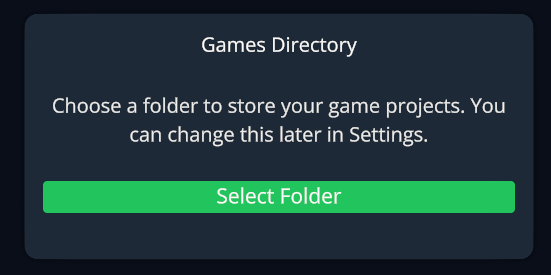
When you open the editor for the first time, you'll be asked to select a game directory. You can select any folder on your PC, although **we recommend creating a dedicated folder to store your games**.
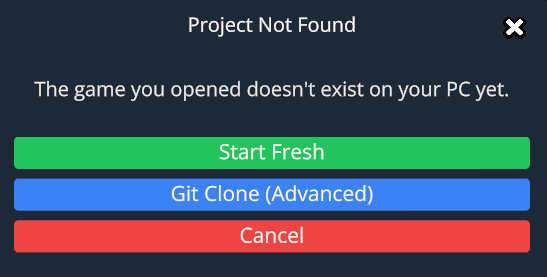
After you've selected a games folder you'll be notified that the project you launched isn't found on your PC already (since this is a new game you're making!)
Select the "Start Fresh" option to pick/create a folder inside your games directory to store a local copy of your new project.
After creating the folder for your game, you'll be launched into the editor and [**you're ready to start building your first game!**](/getting-started/testing-and-publishing.md)
{% hint style="info" %}
If Windows Defender causes a measurable slowdown while files are generated, see [Windows Defender exclusions](/reference/windows-defender-exclusion.md). An exclusion is not normally required.
{% endhint %}